
You publish a page, check it in your own browser, and it looks perfect — yet Google still won't rank it. That's because Googlebot doesn't see your site the way you do. A googlebot simulator closes that gap, showing you exactly what Google's crawler renders, indexes, and judges before you waste another day guessing. This guide shows you how to use one to catch hidden crawl errors and fix them fast.
Table of Contents
- What a Googlebot Simulator Actually Does
- Why Crawl Simulation Matters for SEO and AI Visibility
- Googlebot Simulator vs. Other SEO Crawl Tools
- Step-by-Step: How to Run a Crawl Simulation
- Common Issues a Crawl Test Reveals
- Turning Crawl Data Into an SEO Fix Plan
- Why Manual Crawl Checks Aren't Enough at Scale
- Frequently Asked Questions
What a Googlebot Simulator Actually Does
Crawler view vs. browser view
Open your homepage in Chrome and you see fonts, images, animations, the whole polished thing. That's not what Googlebot sees. At least not at first. A crawler fetches the raw response from your server: the initial HTML, the response headers, the status code, before any JavaScript runs. A Googlebot simulator shows you that raw fetch separately from the fully rendered DOM, so you can spot the gap between "what got sent" and "what eventually shows up."
That separation matters more than it sounds. A 200 status code in your browser tells you nothing about what actually happened during the crawl. Maybe the real response was a 302 redirect chain three hops deep. Maybe a noindex tag got left in from staging. Running a Free Website Crawl Test: What Googlebot Sees will lay out headers, directives, and raw markup side by side instead of blending them into one pretty page view.
Think of it like checking a package before it ships versus after the customer opens it. Both matter. Only one tells you if something broke in transit.
Why rendering differences matter for JS-heavy sites
Modern frameworks — React, Vue, Angular — build pages client-side. That means the content your visitors read often doesn't exist in the initial HTML at all. Googlebot does render JavaScript, but it queues rendering separately, sometimes hours after the first crawl. A simulator exposes both stages, so you can confirm your product descriptions, prices, or blog text actually show up in the rendered DOM, not just in the browser after scripts load.
This is where a lot of e-commerce and SaaS sites quietly lose visibility. Lazy-loaded images never fire without scroll events. Content injected via a third-party widget waits on an API call Google isn't willing to wait for. Blocked JavaScript or CSS files, flagged in robots.txt without anyone noticing, can strip a page down to nearly nothing in Google's eyes even though it looks complete to you.
A visual preview tool won't catch any of this — it renders like a browser, full stop. A crawl simulator mimics the crawler's patience, its timeouts, its blind spots. That's the whole point.
Why Crawl Simulation Matters for SEO and AI Visibility
Impact on traditional Google rankings
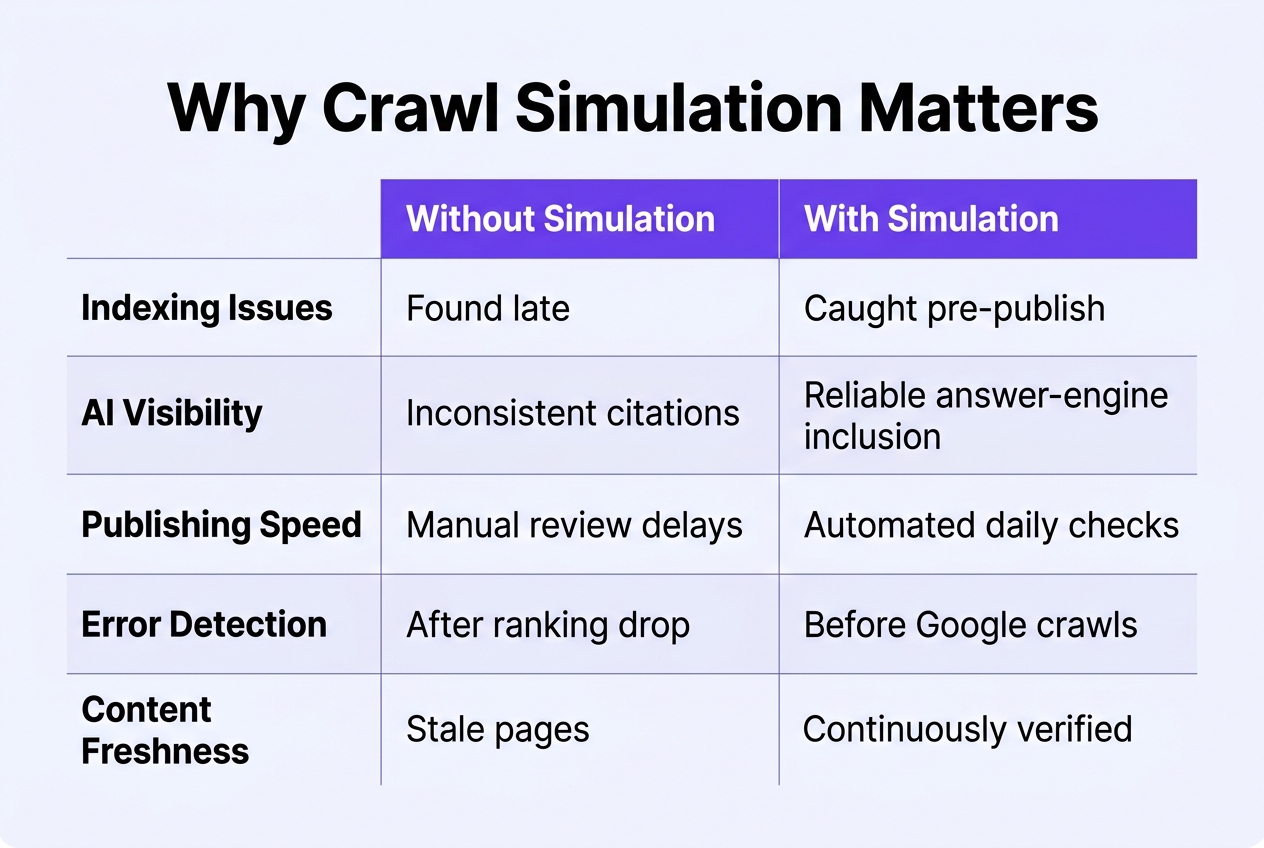
Small mistakes cause big damage here. A stray noindex tag, a broken canonical, or blocked CSS/JS can quietly wipe a page from search results. Nobody notices until traffic tanks weeks later. That's the frustrating part. The bugs are tiny, but the consequences aren't.
New domains have it worse. There's no authority buffer to absorb the hit, so clean crawlability isn't optional, it's survival. Before you launch or publish at scale, it helps to run a Google Crawler Simulator against key pages so you can see exactly what a crawler sees, not what you assume it sees. Here's what usually trips sites up:
- Noindex tags left over from staging environments that never got removed before launch
- Canonical tags pointing to the wrong URL, splitting ranking signals across duplicate pages
- Blocked CSS or JavaScript files that stop Google from rendering the page properly
- Redirect chains that waste crawl budget and delay indexing on brand-new sites
- Thin or duplicate content that gets deprioritized before it ever earns a ranking
Impact on AI citation eligibility
Google isn't the only crawler that matters anymore. ChatGPT, Perplexity, and Google AI Overviews all rely on crawlable, well-structured content before they'll cite a source. If your site can't be read cleanly, you simply don't exist to them, no matter how good the writing is. Catching these issues before launch saves weeks of lost indexing time, and if the fixes feel overwhelming, understanding how to choose the right SEO agency can point you toward help. Curious where your own site stands? A quick quiz can flag the basics in minutes.

Googlebot Simulator vs. Other SEO Crawl Tools
None of these tools are competing for the same job, really. A Googlebot simulator is for a quick spot-check on one page. Google Search Console's URL Inspection tool is for confirming what Google actually did with a page it already knows about. And a full-site crawler like Screaming Frog is for the deep, structural audit. Mixing them up wastes time. Use the wrong one and you'll either miss the big picture or drown in data you didn't need.
Here's how the three stack up on the things that actually matter day to day.
| Tool | Setup required | Scope | Best for | Cost |
|---|---|---|---|---|
| Googlebot simulator | None — paste a URL | Single page | Fast pre-publish checks | Usually free |
| Search Console URL Inspection | Verified property required | Single page, owned domain | Confirming actual crawl/index status | Free |
| Screaming Frog | Software install, crawl config | Entire site (thousands of URLs) | Structural audits, redirect chains, orphan pages | Free tier / paid license |
| Sitebulb | Software install | Entire site | Visual audit reports for clients | Paid |
When to use each tool
Use the simulator when you've just published something and want a quick sanity check. Use Search Console when you need the authoritative answer — it's Google telling you, not a guess. Reach for a full crawler when auditing hundreds or thousands of URLs at once; that's where a broader content scaling guide approach becomes relevant too, since scale changes what tools you need.
Limitations of free online simulators
Free simulators don't log in, don't run JavaScript reliably, and can't tell you Google's actual index status. Treat results as a hint, not a verdict. For anything ranking-critical, verify in Search Console before you act.
Step-by-Step: How to Run a Crawl Simulation
Start simple. Type the full URL into the tester, protocol and all — https:// matters, since a bare domain or an http version can quietly send back different results. Hit run, then wait a few seconds for the fetch to complete. Some tools like a free Googlebot tester will show you the raw fetch response almost instantly, which is handy when you're checking dozens of URLs after a migration.
Reading status codes and headers
Once results load, don't just glance at the status code and move on. Look at the full picture: headers, redirect chains, caching directives. A 200 that took three redirects to get there isn't really a clean 200. Here's what to check first.
| Element | What to Look For | Why It Matters |
|---|---|---|
| Status code | 200, 301, 404, or 500 | Confirms Google reached a live, indexable page |
| Redirect path | Number of hops before final URL | Each hop wastes crawl budget and signal strength |
| Response headers | X-Robots-Tag, cache-control, content-type | Can block indexing even if the page loads fine |
| Meta robots tag | Index/noindex, follow/nofollow | Directly overrides your intent to rank the page |
| Canonical tag | Self-referencing or pointing elsewhere | Tells Google which version owns the ranking signals |
Spotting JavaScript rendering gaps
Now compare rendered HTML against source HTML. This is where things get honest. Plenty of pages look fine in a browser but ship an empty shell in the raw source, with content injected by JavaScript that Googlebot may render late or not at all. Check hreflang tags too, if you run multi-region pages. Then take your flagged issues and cross-reference them against Search Console's coverage and indexing reports. If Search Console shows a page as "crawled, not indexed" and your simulation shows a thin rendered body, you've found your answer.
Common Issues a Crawl Test Reveals
Technical errors that block indexing
Run a simulation on almost any site and you'll find at least one thing quietly sabotaging it. Most of these problems aren't dramatic. They're small leftovers from a redesign or a migration that nobody remembered to clean up. But small doesn't mean harmless — a single wrong directive can keep your best content out of search entirely.
- An accidental noindex or disallow tag left over from a staging environment, silently telling Google to skip pages you actually want ranked;
- Broken or looping redirect chains that bounce a crawler through three or four hops before landing (or never landing) on the final URL;
- Missing or duplicate canonical tags, which confuse Google about which version of a page deserves credit;
- Blocked CSS or JavaScript files that stop the page from rendering fully, so Google sees a stripped-down version of what visitors actually get — this is exactly the kind of gap a Fetch & Render Tool is built to expose;
- Sluggish server response times that flag your site as a soft crawl budget risk, meaning Google visits less often and indexes less of what you publish;
- Missing hreflang tags on multi-region or multi-language sites, which creates duplicate content confusion when Google can't tell your U.S. page from your U.K. page.
Content-level issues affecting quality signals
Technical fixes get pages crawled. But crawling isn't the same as ranking well. Once Google can actually read your pages, it starts judging them — thin sections, repeated boilerplate across service pages, or outdated stats all send weak quality signals. A crawl test won't fix these for you, but it will point straight at them so you know exactly where to focus next.
Turning Crawl Data Into an SEO Fix Plan
Prioritizing fixes by indexing impact
Not every crawl issue deserves the same urgency. Start with anything that blocks indexing outright: stray noindex tags, an overzealous disallow rule in robots.txt, or pages throwing 4xx and 5xx errors. These are the ones keeping whole sections of your site invisible to Google, no matter how good the content is. A blog post with a missing meta description is annoying. A category page returning a 500 error is a fire.
Fix the structural stuff first, then move to cosmetic issues like thin title tags or duplicate meta descriptions. Those matter, but they won't stop a page from getting indexed in the first place. Running a quick check through a tool such as simulate how google sees your pages before you touch anything gives you a clear before-and-after baseline, so you're not guessing which fix actually mattered.
Rank your findings by traffic potential too. A noindex accident on your highest-converting product category is worse than the same mistake on an old, low-traffic blog tag page. Triage by impact, not by how easy the fix is.
Building crawl checks into an ongoing routine
Fix things in batches by template, not one page at a time. If ten product pages share the same broken schema markup, you're likely dealing with a template-level issue, not ten separate ones. Group your fixes by page type: product pages, blog posts, category pages, location pages if you're a local service business. Batching saves hours and keeps your fixes consistent across the site.
After each batch, re-run the simulation. Don't assume the fix worked because it looks right in the browser. Confirm it. Googlebot doesn't render pages the same way you do, and a fix that seems fine visually can still leave a crawl directive untouched underneath.
Finally, treat this as a recurring habit, not a one-off cleanup. Build crawl checks into a monthly or quarterly audit calendar alongside your regular content reviews. Sites change constantly: new plugins, theme updates, migrations, a developer's careless edit to robots.txt. Many local businesses only discover these issues after rankings quietly slip for weeks. A standing schedule catches problems while they're still small.

Why Manual Crawl Checks Aren't Enough at Scale
Running a single check is simple. Paste a URL, hit go, read the results. Five minutes, done. But now imagine doing that across 300 blog posts, a dozen category pages, and a growing product catalog, every single week. That's not a workflow anymore. That's a part-time job nobody signed up for. And honestly, most solo agents, med spa owners, and roofing companies don't have a technician sitting around to babysit crawl logs all day.
The problem gets worse the moment you start publishing often. A site adding fresh content daily needs its crawlability, internal linking, and page structure checked continuously, not once a quarter when something feels off. Skip a week and you might miss a broken internal link pattern that's quietly orphaning ten new pages, or a meta tag error spreading across an entire template. Anyone digging into this seriously should try running a page through the free Googlebot Simulator Online Tool just to see how much technical drift can build up between checks. It adds up fast.
This is exactly why automated publishing systems build clean structure in from the start, rather than fixing it after the fact. Long-form articles that ship with proper meta descriptions, sensible internal and external links, and consistent heading hierarchy simply generate fewer of the crawl errors a simulator would flag. Pair that with steady backlink building, and you get compounding organic visibility while the technical hygiene stays consistent in the background, without anyone manually auditing pages. For SaaS teams and e-commerce stores without an in-house SEO hire, that's the real unlock: less firefighting, more growth that actually sticks.
Frequently Asked Questions
Technical scope questions
Yes, on the good ones. Modern simulators render JavaScript the same way Googlebot does, executing React, Vue, or Angular code before checking the final HTML. That matters because plenty of sites still ship blank pages to crawlers that can't render scripts. A quick technical SEO audit will usually tell you within seconds whether your framework is rendering cleanly or leaving content invisible.
Here's what a solid simulator should also be checking beyond rendering:
- Whether HTTPS pages are serving mixed content, like images or scripts still loading over plain HTTP;
- Missing or misconfigured security headers that can quietly hurt trust signals;
- Broken or conflicting hreflang tags that confuse Google about which country or language version to show;
- Canonical tags pointing to the wrong URL after a migration or redesign;
- Orphaned pages that exist but have no internal links pointing to them at all.
Frequency and scale questions
Run a crawl check after every major deploy, full stop. Between deploys, weekly is fine for most small sites. For large e-commerce catalogs with thousands of SKUs, though, weekly checks won't cut it. Scale changes everything — a free tool that handles 50 pages smoothly can choke, time out, or sample only a fraction of a 10,000-page catalog. That's the honest limit of most free simulators. If you're managing an enterprise site, multiple domains, or need scheduled automated crawls with historical comparisons, a paid crawler like Screaming Frog or Sitebulb becomes worth the cost. Free tools are great for spot checks; paid ones earn their keep at volume.
Before you commit to a direction, it helps to be honest about which problem you're actually solving: a site that can't be crawled properly needs a developer or a technical specialist to diagnose and fix it, and no amount of publishing will paper over that. Once the foundation is sound, the question shifts to whether you can sustain enough quality content to build momentum — and that's where it's worth weighing the cost and pace of a human editorial team against an automated approach like keyword research paired with daily AI-written articles, brand voice controls, and auto-publishing to the platform you already use. Neither path is a substitute for the other, so the most useful thing you can ask yourself is which gap is genuinely holding your traffic back right now, and in what order those gaps need closing.