
Guessing which keywords are actually winnable is a fast way to waste months of content effort on terms you'll never rank for. The "allintitle" search operator solves this by showing you exactly how many pages have your target keyword in the title tag, revealing true competition levels most tools hide. It's simple. Yet almost nobody uses it correctly. And even fewer know how to turn those insights into a real content plan they can execute daily. This guide breaks down exactly how to use allintitle for smarter keyword research in 2026, so you're targeting phrases you can genuinely rank for instead of chasing the impossible ones.
Table of Contents
- What You Need Before You Start This Guide
- Step 1: Understand What an Allintitle Search Actually Does
- Step 2: Run Your First Allintitle Search Correctly
- Step 3: Interpret the Results to Judge Keyword Competition
- Step 4: Build a Shortlist of Low-Competition, High-Opportunity Keywords
- Step 5: Turn Manual Research Into a Repeatable Content Pipeline
- Step 6: Track Whether Your Optimized Titles Are Actually Working
- Wrap-Up: Making Allintitle Research Part of Your Ongoing SEO Habit
What You Need Before You Start This Guide
Tools and access you'll need
You don't need a fancy stack for this. A browser and a search bar will get you most of the way there. But a little prep work upfront will make every allintitle search you run actually mean something, instead of just being a number on a screen.
- Access to Google search, since allintitle runs directly in the search bar with no plugin, extension, or paid tool required.
- A rough list of seed topics or niche keywords you serve, whether that's "roof replacement cost" for a contractor or "botox aftercare" for a med spa.
- A basic read on your target audience's search intent, so you know if they're browsing, comparing, or ready to buy.
- An optional spreadsheet to log each query, its allintitle count, and any notes on competitor pages you spot along the way.
- Enough patience to run several searches in one sitting, since one query rarely tells you the full picture.
That's it. No account signups, no software downloads. Just search and a place to write things down.
Mindset: keyword research is ongoing, not one-time
Here's the mistake most business owners make: they run a batch of searches once, build a list, and never touch it again. Search behavior shifts. Competitors publish new pages. What had zero competition in January might have twenty rivals by summer. Treat this as a habit, not a project you check off.
This matters even more if you're trying to show up in AI-generated answers, not just blue links. Understanding how tools track a llm visibility checker can show you whether your published content is even being picked up by AI assistants, which is a different game than ranking on page one alone. Keep researching. Keep adjusting. That's the whole job.
Step 1: Understand What an Allintitle Search Actually Does
How the operator differs from a normal Google search
A regular Google search looks at everything: page content, titles, headers, even how other sites link to a page. Type allintitle: before a phrase, though, and Google narrows its focus to one thing only — the title tag. It returns pages where every word you typed appears somewhere in that title. Nothing else about the page matters for this count. That's a stricter filter than most people realize the first time they try it.
Compare that to intitle:, which only needs one word from your query to show up in the title, not all of them. Search intitle:roof repair and you'll get pages with "roof" in the title or "repair" in the title, or both — Google's being generous. Run allintitle:roof repair cost and you'll only see pages where all three words made the title cut. That's a narrower, more honest signal of direct competition.
Why does this matter for keyword research? Because it's the closest free method for gauging how many pages are actually fighting for a phrase at the title level, rather than just mentioning it somewhere in the body text. It's a blunt tool. But it's a useful one.
Reading result counts for what they actually mean
Here's the part people get wrong constantly: a low allintitle count doesn't mean nobody's searching for that phrase. It means few pages have bothered to optimize their title tag for it. Those are two very different things. A keyword can pull thousands of monthly searches and still show a tiny allintitle number, simply because most competitors never thought to target it directly in their titles.
That gap is the opportunity. If demand exists but almost nobody has claimed the title tag for it, you've found a phrase where a well-titled article can rank without needing years of accumulated authority. Some SEOs check this alongside tools like Ahrefs or Ubersuggest for volume data, then use allintitle purely as a competition gauge sitting on top of that number.
Don't confuse a low count with an easy win, either. Low competition on title tags still means nothing if the page itself is thin or off-topic. And volume matters too — plenty of small business owners searching this kind of thing end up comparing notes on a marketing blog or two, or pulling up a quick quiz to sanity-check their instincts before committing time to a keyword that only gets three searches a month.

Step 2: Run Your First Allintitle Search Correctly
Once you know what the operator does, the actual typing part is simple. Still, small formatting slips wreck results more often than you'd think, so let's get the mechanics locked in before you run anything real.
Syntax rules and common mistakes
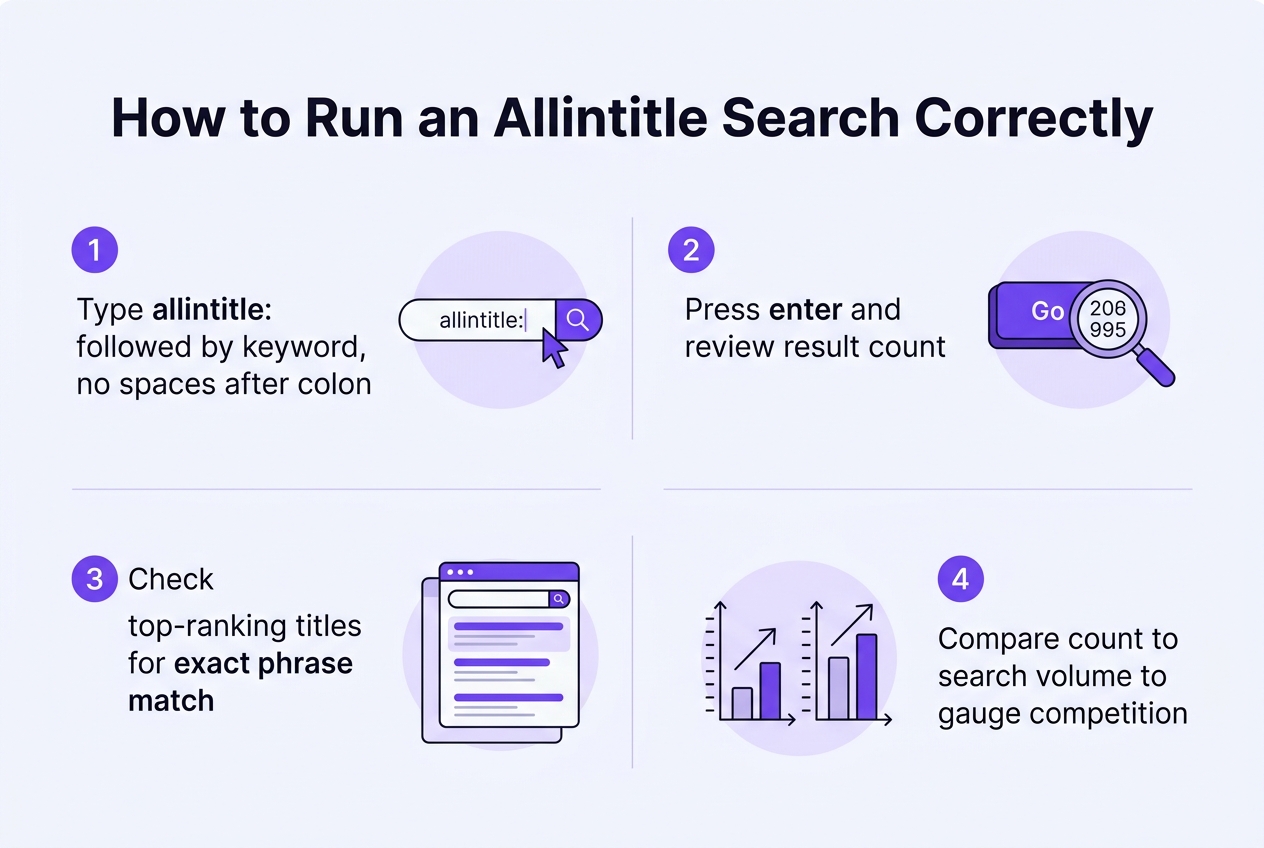
Type allintitle: directly followed by your keyword phrase, with no space after the colon. A space breaks the operator, and Google will quietly treat part of your query as a regular search term instead. If you need an exact phrase match rather than a loose word grab, wrap the phrase in quotation marks. This matters most for multi-word terms like "emergency roof repair," where word order changes what actually gets pulled back.
Once the results load, check the number shown at the top of the page. That count is your first read on competition, though you'll interpret it properly in the next step. Then scroll through page one and actually look at each title. Some pages get swept in on a technicality, not a genuine match. The table below covers the habits worth building right from your first search.
| Action | Why it matters | Quick example |
|---|---|---|
| No space after colon | Prevents the query from splitting into separate terms | allintitle:med spa botox pricing |
| Quote exact phrases | Locks word order for compound terms | allintitle:"insurance quote online" |
| Check result count first | Gives a rough competition signal before you dig in | Compare 40 vs. 4,000 results |
| Scan actual titles on page one | Reveals which sites are genuinely optimized, not just matched | Skim titles for keyword placement |
| Isolate the operator | Mixing with site: or intitle: skews the count | Test one operator at a time |
That last row deserves a plain warning: don't stack allintitle with other operators unless you're deliberately testing something specific. Combine it with site: or intitle: and you'll get a number that looks meaningful but isn't comparable to anything else you've pulled. For a broader look at how search operators fit into a wider content strategy, this seo automation guide walks through where manual research ends and automated publishing picks up. Keep each search clean, one variable at a time. It's tedious. It's also the only way the numbers mean anything.
Step 3: Interpret the Results to Judge Keyword Competition
Reading result counts against search volume
The allintitle number by itself doesn't tell you much. It's a ratio game. You need to compare that count against how many people actually search the term each month. Pull up a search volume checker, note the monthly figure, then set it next to your allintitle result. A term with 800 monthly searches and only 12 allintitle results is a completely different opportunity than one with 800 searches and 4,000 results.
Here's the pattern worth memorizing: high search volume paired with a low allintitle count usually signals a gap nobody's exploited yet. Few sites have bothered to target that exact phrase in their title tag, which means less direct competition for that specific ranking signal. It's not proof you'll rank tomorrow. But it's a strong hint the door's open.
Don't get fooled by round numbers either. A keyword showing "0" allintitle results with real search volume behind it is rare, and usually means you've found either a fresh trend or a phrase people search but rarely write about directly. Either way, that's worth flagging for your content list before someone else notices it.
Where allintitle fits alongside KGR-style checks
If you've spent any time in SEO forums, this will sound familiar. The Keyword Golden Ratio, or KGR, is built on nearly the same logic: divide the allintitle count by monthly search volume, and if the result lands below roughly 0.25, the keyword is considered low competition and worth targeting. Allintitle checks are essentially the raw ingredient KGR calculations run on. You don't need to obsess over the exact formula, but understanding the concept helps you avoid chasing keywords that look easy but aren't.
Numbers alone can still mislead you, though. Cross-check every promising keyword against the People Also Ask boxes and the related searches list at the bottom of the results page. If those sections show queries that don't match what you assumed the searcher wanted, the low allintitle count might mean something else entirely — like nobody's searching it that way, not that it's an open opportunity. This step also catches issues some searchers report with allintitle behaving inconsistently, an issue Google's own support forum has documented in threads about allintitle search not returning expected results for certain accounts.
Bottom line: never trust one number in isolation. Pair the allintitle count, the search volume, and the intent signals from PAA boxes together. Skip that combo and you're just guessing with extra steps.
Step 4: Build a Shortlist of Low-Competition, High-Opportunity Keywords
Sorting keywords into competition tiers
By now you've got a pile of allintitle numbers. Time to turn that pile into a real shortlist. As covered on What is Allintitle?, the count reflects title-level competition, not overall search volume, so use it as a filter, not a final verdict. The goal here is simple: keep what's winnable, drop what isn't.
Start by bucketing every keyword into rough tiers based on its allintitle count. This step alone will cut your list in half and save you from chasing terms you'll never rank for.
- Under 10 results means light competition, and these are usually your fastest wins, especially for niche services or specific city-plus-service combos.
- Between 10 and 100 results is a middle tier worth pursuing if the phrase is highly specific to what you sell or where you're located.
- Over 100 results signals a crowded title field, often dominated by directories, review sites, or national brands you simply can't out-title right now.
- Long-tail phrases tied to a specific service, product, or neighborhood almost always beat broad, generic terms, even when their search volume looks smaller on paper.
- Question-style phrases pulled from People Also Ask boxes deserve their own spot on the list, since they tend to have thin, weak competition and match how people actually search.
- Any keyword dominated by major review sites, big-box retailers, or government and directory pages should get crossed off, no matter how good the volume looks.
Once you've sorted the survivors, don't just dump them into a spreadsheet and forget it. Tag each phrase with its intent: informational, commercial, or local. A saved note like "commercial, local, buyer-ready" tells you exactly how to write the piece later. Skip this labeling step and you'll end up with a list that looks organized but tells you nothing useful when it's time to write.
Step 5: Turn Manual Research Into a Repeatable Content Pipeline
Where manual research hits its limits
Running an allintitle search by hand works fine when you're checking three or four terms. Try it across sixty keywords a week and the wheels come off fast. You're copying numbers into a spreadsheet, re-checking results as they shift, and losing an afternoon you didn't have. Manual checks don't scale — they're a spot-check tool, not a pipeline.
A solo insurance agent covering auto, home, and life policies across several towns might need a hundred keyword variations tracked and refreshed monthly. Doing that solo, alongside actual client work, just doesn't happen. Something has to give, and usually it's the research itself getting skipped entirely.
Here's the blunt part: most people who start manual allintitle research quit within a month. Not because it doesn't work. Because nobody has the spare hours to keep it going every single week.
Automating the research-to-published-article workflow
This is where a tool like RankPush picks up the slack. Instead of you running searches one at a time, RankPush's keyword research continuously scans for high-volume, low-competition terms specific to your niche — roofing repairs in your service area, med spa treatments trending locally, SaaS features your competitors haven't written about yet. The research runs in the background, every day, without you touching a spreadsheet.
Once a keyword is shortlisted, the next bottleneck is usually writing. That's solved by RankPush's daily AI-written SEO articles, often 3,000+ words with AI-generated images and internal links built in, published automatically to WordPress, Shopify, Wix, Webflow, or any site via webhooks through its auto-publishing feature. No writer, no editor, no publishing delay — this is automation running at $99/month, not an agency retainer with a human team behind it. Brand voice customization keeps tone consistent — a med spa can sound warm and reassuring, a roofing company can sound direct and no-nonsense — while SEO/GEO article scoring flags whether each piece is actually structured to rank and get cited by AI answer engines before it goes live. If a niche spans multiple languages, content in 100+ languages covers that too.
This is the real shift: a growth plan and content calendar built around your niche replaces the manual lookup entirely. The insurance agent or med spa owner stops hunting for keywords one search at a time and starts reviewing a pipeline that's already running.

Step 6: Track Whether Your Optimized Titles Are Actually Working
Picking a low-competition title is only half the job. You still need to check if it's paying off. Skip this step and you're just guessing forever.
What to monitor after publishing
Set a recurring reminder to re-run your allintitle checks every few weeks. Competition shifts. A keyword that showed 40 competing titles in January might show 90 by summer if other sites in your niche caught on. That's your early signal to pivot before rankings slip.
Beyond that, you need to know what's actually happening on your own site and in AI answers. Different tools answer different questions, so don't expect one dashboard to cover everything:
| What you're checking | Tool type | What it tells you | How often to check |
|---|---|---|---|
| Title competition levels | allintitle search | Whether more sites are now targeting your exact phrase | Every 3-4 weeks |
| On-site article performance | Domain tracking | How published articles trend on your own site over time | Weekly |
| AI answer citations | AI visibility tracking | Whether ChatGPT, Perplexity, Claude, or Google AI Overviews mention your content | Monthly |
| Google rank position | Dedicated rank tracker | Exact SERP position for target keywords | Weekly or as your tool allows |
| Client-facing reporting | SEO reporting dashboard | Traffic and ranking summaries for stakeholders or clients | Monthly |
Worth being clear here: RankPush's domain tracking and AI visibility tracking show you performance on your site and in AI answers. They're not a substitute for a dedicated Google rank tracker or a client-facing SEO reporting dashboard — that's a separate category of tool entirely, and you'll want to get it elsewhere if you need it. If you already run one of those, keep it. Just feed it what you learn from allintitle and let both loops inform your next round of titles.
Wrap-Up: Making Allintitle Research Part of Your Ongoing SEO Habit
Let's be clear about what allintitle actually is. It's a fast, free gut-check on title-level competition. Nothing more. It won't tell you search volume, won't show you what questions people are asking, and won't confirm anyone actually wants what you're about to write. Pair it with a volume check, a scan of the "People Also Ask" box, and an honest read on search intent before you commit a keyword to your content calendar. Skip that pairing and you're just guessing with extra steps.
Doing this by hand a few times a month? Totally fine. That's occasional research, and a spreadsheet works. But if you're publishing daily, manual allintitle checks turn into a part-time job fast — and that's exactly the gap RankPush is built to close, folding keyword research into a repeatable daily pipeline instead of a Tuesday-afternoon chore.
Here's the payoff worth remembering: consistent publishing built on smart keyword selection compounds. Not overnight — over months. Even brand-new domains with zero authority have climbed into rankings this way, one well-chosen title at a time. Set a quarterly reminder to revisit your shortlist, too. Competition shifts, new sites enter your niche, and last quarter's easy win might be crowded by spring.
Getting comfortable with allintitle and the other search operators can sharpen how you research competitors and content gaps, but that kind of manual digging only goes so far when you're trying to publish consistently. Once you've got a sense of what's ranking, the next step is turning that insight into a steady stream of optimized content, which is where a tool like RankPush's keyword research and daily AI-written articles can pick up the slack. Think of the operators as your magnifying glass and the content engine as what actually moves the needle over time.