
You've published the articles, tightened the titles, maybe even earned a few links — and Google still acts like your pages don't exist. That gap almost always traces back to step one: whether a bot ever found and fetched your URL. The crawling definition sounds simple on paper — search engines send automated bots to discover and fetch pages by following links and sitemaps — but in 2026, with AI assistants pulling from the same index, what gets crawled decides what gets cited. Here's how discovery really works, what quietly blocks it, and why publishing consistently gives crawlers a reason to come back.
Table of Contents
- What "Crawling" Means in Plain Language
- Crawling Definition for Search Engines and AI Answer Engines
- How a Crawler Moves Through a Website Step by Step
- Types of Crawls You'll Encounter
- Signals That Control What Bots Can and Cannot Fetch
- Common Crawling Problems and Practical Fixes
- Getting Crawled More Often With Fresh, Linked Content
What "Crawling" Means in Plain Language
The Dictionary Senses of the Verb
Open any dictionary and "crawl" has nothing to do with the internet. It means moving on your hands and knees, the way most babies do somewhere between 7 and 10 months old. It also means moving painfully slowly. Think of traffic crawling along at 4 mph during rush hour, or a Friday afternoon that just won't end.
There's a third sense. To be full of something — usually something you'd rather not be full of. A room crawling with ants. A basement crawling with spiders. Then there's the social version: crawling to your boss for a raise, which nobody enjoys admitting to.
All three share one idea: slow, close, thorough contact with a surface. That's the thread that carried the word online.
How the Word Became a Web Term
In the early 1990s, the first programs that fetched web pages did it one link at a time. Grab a page, read its links, follow one, grab that page, repeat. Engineers called the behavior "crawling" the web, and the names stuck: web crawler, spider, bot. The metaphor was honest. These programs were creeping across a network of connections, page by page.
This article sticks with the technical meaning: software that automatically requests and downloads pages so their content can be stored and evaluated. If you want the broader mechanics of automation in search, a practical seo automation guide fills in the surrounding workflow nicely. The baby and the ants get one honorable mention and nothing more.

Crawling Definition for Search Engines and AI Answer Engines
Formally, crawling is the process by which an automated program requests URLs, downloads the HTML and supporting assets, and follows the links it finds to discover even more URLs. That's it. No judgment about quality yet. No decision about who ranks. Just fetching and collecting addresses, over and over, at a scale no human could match.
Crawler, Spider, Bot: Same Thing, Different Names
Crawler, spider, robot, bot — all the same software. The naming is historical, not technical. Google runs Googlebot, Microsoft runs Bingbot, and each one identifies itself in a user-agent string when it knocks on your server.
The bigger shift is the AI crawlers now in the mix. GPTBot and OAI-SearchBot come from OpenAI, PerplexityBot powers Perplexity's answers, ClaudeBot handles Anthropic's fetching, and Google-Extended governs whether your pages feed Gemini and AI Overviews training. Blocking one doesn't block the others. They're separate agents with separate rules, and plenty of site owners have quietly cut themselves out of AI answers without realizing it.
A single crawl request is unglamorous. The bot sends an HTTP GET, your server returns a status code — 200, 301, 404, 503 — and if it's a 200, the HTML comes back. The crawler parses that HTML, pulls out every link, and drops new URLs into a queue. Local service sites see this constantly; industry write-ups on med spa marketing and roofing lead generation both point to discovery as the first bottleneck, and our terms reflect the same crawl-first reality.
Crawling vs. Rendering vs. Indexing vs. Ranking
People blur these four constantly. Crawling is discovery and fetching. Rendering means executing JavaScript so the page looks like what a browser shows. Indexing is storing and understanding that content. Ranking — or citation, in an AI answer — is choosing what actually gets shown.
Each stage can fail on its own. A page can be crawled and never indexed. It can be indexed and never ranked. And crawl budget — how many URLs a bot will fetch from your site in a given window — is set by demand for your content and what your server can handle without choking.

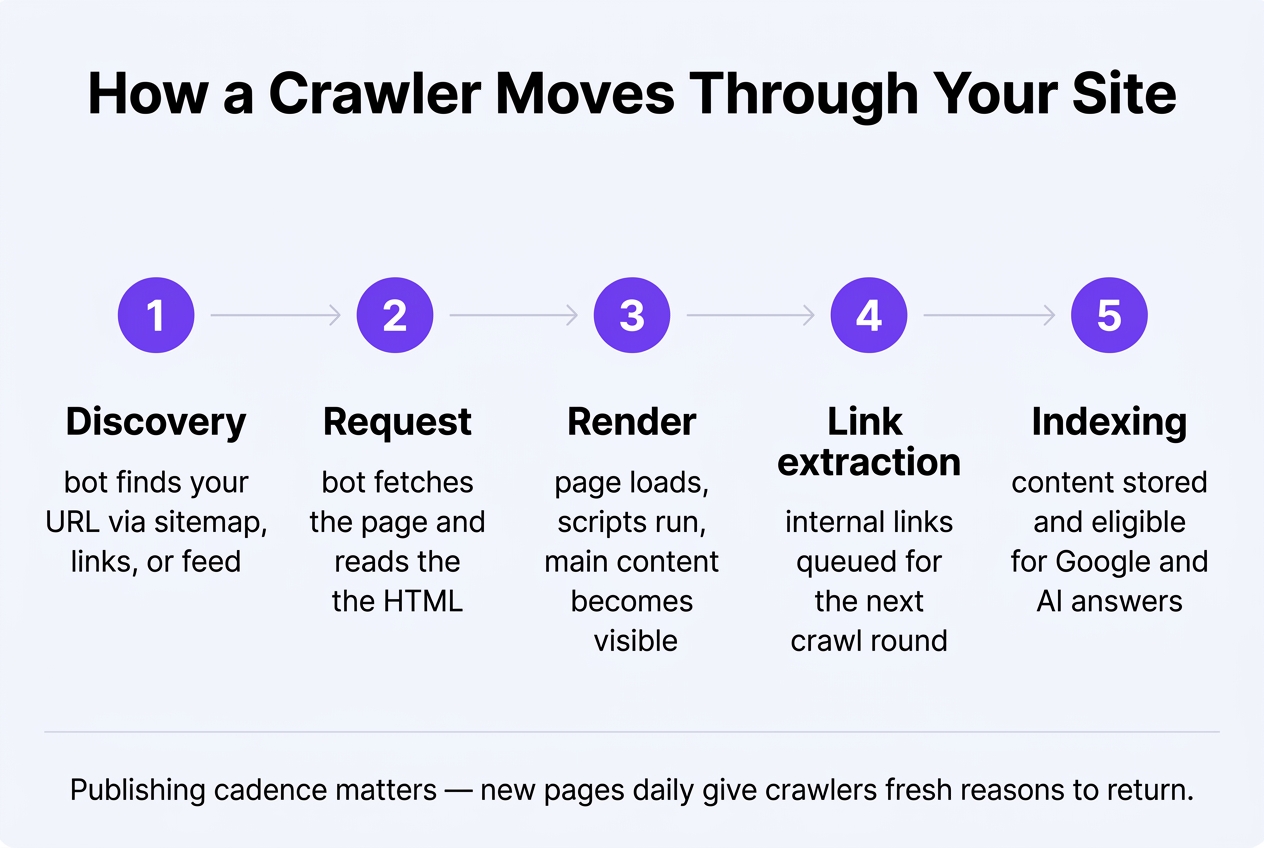
How a Crawler Moves Through a Website Step by Step
From Seed URL to Recrawl Schedule
A bot doesn't wander. It runs a loop, and every pass is a decision about where to spend limited resources. It starts with seed URLs: your XML sitemap, pages it crawled last week, links it found on other sites. Then it fetches robots.txt before requesting anything else. Only after that does your homepage get touched.
Here's the full sequence, plus what usually derails each stage.
| Step | What the bot does | Signal it reads | What breaks it |
|---|---|---|---|
| 1. Seed & queue | Pulls known URLs from sitemaps, prior crawls, external links | Sitemap lastmod, inbound links, click depth | Orphan pages with zero internal links |
| 2. robots.txt check | Fetches /robots.txt, applies Allow/Disallow rules | User-agent blocks, crawl-delay | A stray Disallow: / left from staging |
| 3. Prioritize | Ranks the queue by importance and freshness | Update frequency, link depth (3 clicks beats 7) | Millions of faceted filter URLs flooding the queue |
| 4. HTTP request | Requests the URL, acts on the status code | 200, 301, 304, 404, 410, 429, 5xx | 429s and 5xx spikes; the bot backs off fast |
| 5. Parse & render | Reads HTML, extracts links, checks canonical and meta robots; queues JS rendering if needed | rel=canonical, noindex, nofollow | Content that only appears after a click or scroll |
Status Codes a Bot Reads Differently Than a Human
You see a 404 page and hit back. A crawler logs it and schedules a retry, because 404 means "gone for now." A 410 means "gone permanently," and bots drop those faster. A 304 Not Modified saves everyone bandwidth and often earns you a more frequent recrawl. Publishing volume shifts this math too, and a solid content scaling guide explains why sites adding pages daily get sampled more aggressively than static ones. Fix the codes first. Then feed the loop.
Types of Crawls You'll Encounter
Search Engine Crawls vs. Third-Party Crawls
Not every bot hitting your server works for Google. Googlebot and Bingbot want indexable pages. Plenty of other crawlers want your data for entirely different reasons. The word itself is borrowed from movement on hands and knees — the same sense you'd find in an article about human crawling as a stage of movement — and the metaphor holds, because bots move slowly and touch everything on the way.
Here's what actually shows up in your server logs:
- Discovery crawls hunt for URLs a bot has never seen, usually from a sitemap or a new internal link, while refresh crawls revisit known pages to check whether anything changed since last time.
- Vertical crawlers specialize: Googlebot-Image, Googlebot-Video, Googlebot-News, and the merchant feed fetchers that read your product data on a separate schedule from your blog.
- Third-party bots include SEO tool crawlers like Screaming Frog and Sitebulb, archive bots such as the Internet Archive's ia_archiver, and AI training crawlers like GPTBot and ClaudeBot.
- Scrapers pretend to be browsers, ignore robots.txt entirely, and can eat more bandwidth in an hour than Googlebot uses in a week.
- Internal crawl simulations, run by your developer before launch, surface broken links and redirect chains while it's still cheap to fix them.
Depth, Frequency, and Scope
Scope varies too. A full-site crawl walks every reachable URL; a partial or sampled crawl grabs a few hundred pages to estimate quality. Scheduled crawls run on the bot's own timetable, while on-demand crawls happen when you submit a URL for inspection or ping a sitemap. Deep crawls reach pages five or six clicks from the homepage. Shallow ones stop at two or three. If your best article sits six clicks deep, it might as well be invisible. Keep it three clicks out.
Signals That Control What Bots Can and Cannot Fetch
Directives vs. Discovery Signals
Your robots.txt file sits at yoursite.com/robots.txt and tells bots which paths to skip. You can target specific agents — User-agent: Googlebot, User-agent: GPTBot — and declare your sitemap location on one line. One catch trips up almost everyone. A Disallow rule blocks fetching, not indexing. If other sites link to a blocked URL, Google can still list it with no description.
To actually keep a page out of results, you need a meta robots tag or an X-Robots-Tag HTTP header carrying noindex. Other values matter too: nofollow, noarchive, and max-snippet:150 for snippet length. Here's the irony — the bot has to crawl the page to read that instruction. Block it in robots.txt and the noindex never gets seen. The word itself implies slow, methodical movement on all fours, and the dictionary sense of crawl matches how bots inch through URLs one request at a time.
Canonical tags, rel next/prev pagination, and rules for faceted parameters like ?color=blue&size=xl are efficiency levers. An e-commerce filter set can spawn 40,000 near-duplicate URLs from 300 products. On the bright side, internal links and XML sitemaps are the two discovery signals you fully control.
Where Technical Fixes End and Content Begins
Servers matter more than most owners think. If your time-to-first-byte creeps past 600ms, or your host starts returning 429 and 503 responses under load, crawlers back off and fetch fewer pages per visit. Cheap shared hosting quietly caps your crawl rate. Nobody emails you a warning about it.
Diagnosing all of this — log file analysis, header audits, redirect chains, parameter handling — is developer and technical-SEO-audit work. You'd hire an agency or run crawlers like Screaming Frog to map it. Get that foundation right first. Then let a publishing engine handle keyword research and steady daily articles on top of a site bots can already reach.
Common Crawling Problems and Practical Fixes
Symptoms, Causes, and Owners
Most crawl problems show up as a number that doesn't match reality: 4,000 URLs discovered, 600 indexed. The word itself suggests slow, ground-level movement, and if you look up the dictionary sense of crawling, that's a fair mental model for how bots work through a messy site. Below are the failures that eat crawl requests most often, plus who actually owns the fix.
| Symptom | Likely cause | Where to verify it | Who typically fixes it |
|---|---|---|---|
| Page gets zero impressions and isn't in the index | Orphan page with no internal links pointing to it | Crawl your site with Screaming Frog, compare against your XML sitemap | Content workflow (add links from related posts) |
| Thousands of URLs discovered, few indexed | Crawl trap: infinite calendar dates, session IDs, endless filter combos | Search Console "Crawled – currently not indexed" and server log samples | Developer, with a technical SEO specialist scoping rules |
| Bots fetch 5 URLs to reach 1 page | Redirect chains or a loop from old migrations | Screaming Frog redirect report; curl the URL and count hops | Developer |
| Money pages recrawled every 6+ weeks | Thin or duplicate URLs absorbing crawl budget; stale content sitewide | Search Console Crawl stats, plus last-modified dates per URL | Content workflow, backed by a technical SEO specialist |
| Menu and category links invisible to parsers | JavaScript-only navigation rendering links client-side | Disable JS in the browser, or use the URL Inspection rendered HTML tab | Developer |
Why Publishing Cadence Affects Recrawl Frequency
Crawlers budget their time based on how often your site actually changes. Ship one useful page a day and bots learn to come back daily. A site frozen since last spring gets checked monthly, maybe. Fixing traps and chains belongs to your developer or a technical specialist. Keeping the site worth revisiting is a content job, and that's where consistent automated publishing earns its keep.
Getting Crawled More Often With Fresh, Linked Content
Crawl demand goes up when a site changes. A brochure site untouched since 2021 gets visited rarely. A site that adds something new every day teaches bots to check back often. That's the whole game. New domains have it hardest, because nothing points at them yet — no internal paths, no external references, no reason for a bot to wander over. The word fits: dictionary definitions of to crawl describe slow, deliberate movement, which is exactly how discovery feels on a fresh domain.
A Publisher's Checklist for Better Crawl Coverage
You don't need a complicated plan. You need consistency plus connection — new pages bots can actually reach. Work through these:
- Publish on a predictable cadence, whether that's daily or three times a week, so revisit patterns have something to lock onto.
- Link every new article into an existing topic cluster, and add a link back from two or three older posts so it isn't stranded.
- Keep your XML sitemap updating automatically on publish rather than regenerating it by hand every few months.
- Earn links from niche-relevant sites — a roofing blog linked from a regional contractor directory gets found faster than one linked from nowhere.
- Check server logs or Google Search Console crawl stats occasionally to confirm bots are actually returning.
Where Automated Daily Publishing Helps (and Where It Doesn't)
Automation handles the volume problem well. A platform can research keywords, write long-form articles with internal and external links, generate meta descriptions and images, then push them live to WordPress, Shopify, Wix, Webflow, or any platform via webhooks — roughly five minutes of setup, around $99 a month per site. What it won't do is fix broken redirects, repair crawl errors, or move your hosting. That's developer territory. No amount of publishing patches a misconfigured server. Fix the plumbing first. Then let the content keep bots coming back — including GPTBot, PerplexityBot, and ClaudeBot, with visibility tracking showing where you get cited.
Before you commit to any one path, it's worth getting honest about which problem you're actually solving: a site that search engines struggle to crawl needs a developer or technical specialist, while a site that's technically sound but simply has nothing to rank is a content and authority problem instead. Ask what your logs and Search Console are really telling you, how long you can wait for results, and whether the fix you're considering addresses the bottleneck or just the symptom you noticed first. Most sites eventually need both — clean infrastructure underneath and a steady stream of pages worth finding — and knowing which one is holding you back today makes the sequencing much easier.