
You've probably typed "google search google or type url" into your own address bar without thinking twice about it. But that tiny prompt sitting inside Chrome's omnibox quietly decides how traffic finds your site in 2026. It's not just a search bar. It's a routing decision that favors brands people already recognize and trust. If your content isn't showing up consistently enough to earn that recognition, you're losing clicks before the search even happens. This article breaks down what the omnibox actually does, why it matters more than ever, and how daily published content keeps your site in that trusted path.
Table of Contents
- What Does 'Search Google or Type a URL' Mean in Your Browser
- How the Omnibox Decides Between a Search and a Direct Visit
- Searching on Google vs. Typing a URL Directly
- Getting More Out of Google Search
- Visiting a Website Safely After You Search or Type
- Why Showing Up in the Search Results Matters More Than the Omnibox Debate
- Building the Visibility That Turns Searches Into Direct Traffic
What Does 'Search Google or Type a URL' Mean in Your Browser
Where the omnibox lives in Chrome, Edge, and Safari
Open a new tab in Chrome and you'll see it right there: a single bar at the top with faint gray text reading "Search Google or type a URL." That's the omnibox. It's not a hint about two separate tools. It's one input field doing two jobs at once. Edge shows nearly the same wording, since it's built on the same Chromium engine as Chrome. Safari phrases it a bit differently, usually "Search or enter website name," but the mechanics underneath are identical.
Before 2008, browsers kept these functions apart. You had an address bar for URLs and a separate search box, often tied to Yahoo or a toolbar plugin, sitting next to it. Chrome's launch merged them into one bar. The rest of the industry followed within a few years. Firefox calls its version the "awesome bar." Safari just calls it the smart search field. Different names, same idea: type anything, and the browser figures out what you meant.
That's a small design choice with a big effect on daily browsing habits. You stopped thinking about which box to use. You just started typing, whether it was a full web address, a half-remembered brand name, or a question. Writers and marketers researching this topic often land on an seo automation guide while trying to understand how this shift in browser behavior changed the way people reach websites in the first place.
Why browsers merged the search bar and address bar
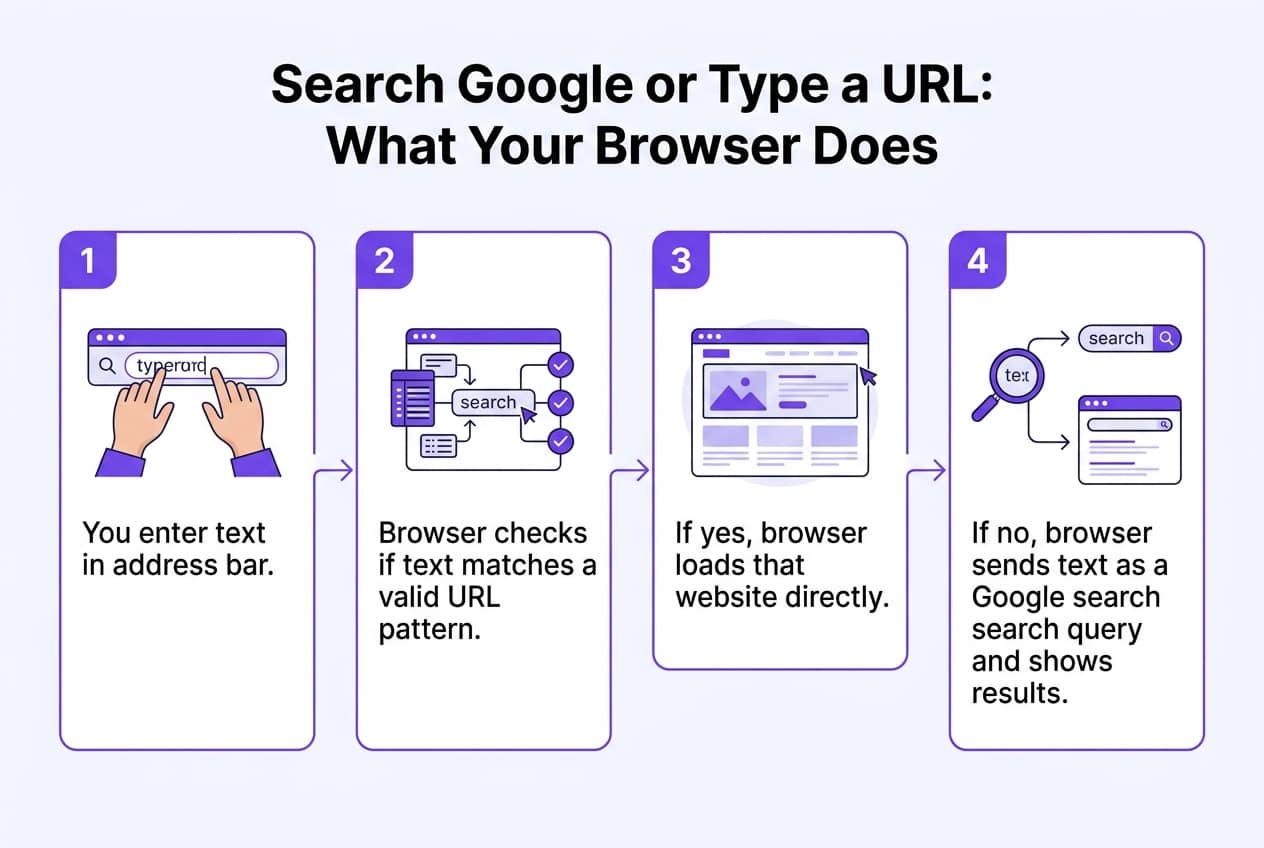
The merge wasn't cosmetic. It was a bet that most people couldn't reliably tell a URL from a search query. Honestly, they were right. Type "nike.com" and the browser treats it as a navigation request. Type "running shoes near me" and it routes you to a search engine instead. The browser makes that call instantly, using patterns like dots, slashes, and known domain suffixes to guess intent.
This matters because fewer steps mean fewer chances to lose the user. Every extra click or decision point is a spot where someone might bounce, get confused, or just give up. One bar, one habit, zero friction. That's the whole philosophy behind it.
It also explains why so many people end up typing that exact placeholder phrase into Google itself. They see the grayed-out text, assume it's an instruction rather than an example, and search it literally out of curiosity or confusion. It's a strange side effect of good design: the hint text became famous enough to be its own search query. For businesses, the lesson underneath all this is simpler than it sounds. Most of your potential customers never type a URL at all. They search, and showing up in that search is what actually brings them to your site.
How the Omnibox Decides Between a Search and a Direct Visit
Signals that trigger a direct site visit
The omnibox runs a quick syntax check before it does anything else. It's looking for a dot followed by a recognizable ending: .com, .net, .gov, .io, and now dozens of newer extensions. Type "statefarm.com" or "bestroofingnj.com" and the browser recognizes the pattern instantly. No spaces, a valid TLD, maybe a protocol prefix like https:// already attached — that's enough to convince it you mean a destination, not a query. It skips the search step entirely and starts resolving the domain.
Protocol prefixes make the decision even easier. If you type "www." or "https://" before anything else, you've basically removed all doubt. Browsers treat that as a direct declaration of intent. The same goes for input with no spaces that resembles a single word plus an extension, like "yelp.com" versus "best pizza near me." One looks like an address. The other looks like a sentence. That distinction, oddly simple, is what most of this decision comes down to.
Autocomplete adds another layer on top of the raw syntax check. As you type, the browser cross-references your browsing history, saved bookmarks, and commonly searched phrases to guess where you're headed. Type "face" and it might suggest "facebook.com" based on past visits, even before you finish typing. This is partly why understanding how autocomplete prediction models get built matters for anyone studying search behavior, alongside other research on query patterns and user intent. Your own history is quietly steering half these decisions, which is worth remembering next time autocomplete seems to read your mind.
If none of those direct-visit signals fire, the browser defaults to search. Multiple words, a question mark, phrases like "how much does roof replacement cost" — none of that resembles a domain, so it routes straight to Google. This matters more than it sounds. Most people never type a full URL anymore; they type what they're thinking, and Google's spam policies explicitly list excessive link exchanges as one of many signals shaping what shows up in response. That's a blunt reminder: ranking well in that search result is the only way to be found. A perfect site nobody sees doesn't help your traffic at all.
Searching on Google vs. Typing a URL Directly
Both habits get you somewhere. But they get you there differently, and knowing which one fits the moment saves time and avoids a few traps along the way.
When each method is the smarter choice
Typing the URL wins when you already know it. No results page, no scanning, no second-guessing. You hit enter and you're there. That's ideal for logging into your bank, checking webmail, or returning to a site you visit daily. Searching, on the other hand, is the better tool when you're comparing options, researching a roofer, or looking for a med spa near you and have no idea which domain to trust. Google also catches things a direct visit never will: reviews, nearby alternatives, and content published an hour ago. There's a safety angle too. Typing a URL sidesteps the sponsored slots at the top of a results page, some of which lead to lookalike domains built to mimic a real brand.
| Scenario | Better method | Why |
|---|---|---|
| Returning to your bank or webmail | Type the URL | No results page, no risk of a spoofed ad |
| Finding a local roofer or med spa | Search Google | Surfaces reviews, maps, and competitors you didn't know about |
| Checking today's news or a trending topic | Search Google | Index refreshes constantly; a saved URL may be outdated |
| Visiting a known SaaS tool's login page | Type the URL | Fastest route, skips ad placements entirely |
| Comparing products before buying | Search Google | Shows multiple sellers, prices, and fresh reviews side by side |
Notice the pattern: typing wins on speed and certainty, searching wins on discovery. If you already trust a brand name, skip the search bar. If you're forming an opinion or shopping around, let Google do the surfacing. For businesses trying to be the thing people discover rather than the thing they already know, showing up in that search-driven moment matters more than ever. That's partly why tools that boost AI citation alongside traditional rankings, including an llm visibility checker, have become part of the conversation around visibility in 2026.
Getting More Out of Google Search
Most people type a few words into Google and hope for the best. That works, sort of. But Google's search box is really a small command line, and learning its shortcuts gets you better results in half the time. This matters whether you're researching competitors, hunting down a form, or checking where your own business shows up. If you're still deciding between typing a search term or a full web address, how to decide between the two is a useful starting point before you dig into these operators.
A handful of search operators turn a vague query into a precise one. They're free, built into Google, and take about five minutes to learn:
- Wrap a phrase in quotation marks to force Google to match that exact wording, which is handy when you're checking if a competitor copied your tagline word for word.
- Add a minus sign before any term you want excluded, like searching "roofing estimate -free" when you're tired of ads promising no-cost quotes.
- Use site: followed by a domain to search only within one website, which is the fastest way to see every page Google has indexed for your own site or a rival's.
- Try filetype: to pull up PDFs, spreadsheets, or Word docs directly, useful for finding insurance rate sheets or permit forms that live outside normal web pages.
- Open the Tools menu under the search bar to filter results by date, region, or switch to verbatim mode, which stops Google from quietly substituting your keywords with synonyms.
- Drag a photo straight into the search bar for a reverse image search, which helps confirm whether someone's using your product photos without permission.
None of this requires special software. It's just muscle memory. Once you start combining operators, say, site: plus quotation marks, you'll find exactly the page you're picturing instead of scrolling through ten results that sort of match. Small habit, real time saved.
Visiting a Website Safely After You Search or Type
Getting to a site is one thing. Trusting it with your email, your card number, or your login is another. Before you click anything that asks for personal data, slow down for ten seconds. That habit alone stops most of the damage.
Spotting a fake or spoofed domain
Scammers love the fact that millions of people type URLs from memory or click the first blue link they see. A convincing fake site doesn't need to fool everyone. It just needs to fool enough people to be profitable. Here's what's worth checking every time, especially on an unfamiliar link:
- Confirm HTTPS and a valid padlock before typing in any password, payment info, or personal details, since plain HTTP pages send data unencrypted.
- Read the domain letter by letter, not just at a glance, because typosquatted URLs swap one character (like "rankpuhs.com" or "arnazon.com") to mimic a real brand.
- Check for extra words or hyphens bolted onto a trusted brand name, a common trick used to make a scam domain look official at first glance.
- Look for "Sponsored" or "Ad" labels above search results before clicking, so you know whether you're on an organic listing or a paid placement that anyone can buy.
- Pay attention to browser warnings like "Dangerous site ahead" or "Deceptive site," since these come from flagged-site databases, not random pop-ups to dismiss.
- Hover before you click on any link in an email or text to preview the real destination URL in your browser's status bar.
None of this takes long. A site that can't pass a five-second check isn't one worth trusting with your information.
Why Showing Up in the Search Results Matters More Than the Omnibox Debate
Turning searchers into repeat direct visitors
Here's the truth about how people actually find a roofing company or a med spa: they don't know the URL. Nobody memorizes insurancename-agency-nj.com. They open Google, type "roof repair near me" or "botox clinic in my city," and click whatever shows up first. Typing a URL directly is a habit earned later, not a starting point. It only happens after someone already knows you exist.
That's the part a lot of business owners miss. If your site doesn't show up on that first search, you never get a second chance at becoming someone's default bookmark. The visitor searches, finds a competitor, books with them, and now that competitor is the one getting typed into the address bar next month. Ranking isn't just about today's click — it's about whether you ever get added to someone's mental shortlist at all.
Direct, branded traffic — someone typing your business name or your actual domain — is the strongest signal a site can have. But it's a lagging indicator, not a starting point. It's earned by showing up consistently in Google results first, enough times that your name sticks. A roofing company that ranks for a dozen local repair terms this month starts seeing branded searches for its own name three or four months later. That's the pattern, over and over.
There's a newer wrinkle worth paying attention to, too. The same visibility that earns a spot in Google's results is largely what gets a business cited inside ChatGPT, Perplexity, and Gemini when someone asks for a recommendation. These AI answer engines pull from indexed, well-structured web content — much of it the same pages already ranking organically. Skip the search rankings, and you're invisible in both places at once. Show up consistently, and you've got a shot at both.
Building the Visibility That Turns Searches Into Direct Traffic
What this looks like for a local or niche business
Technical site health comes first. If your pages load slowly, break on mobile, or fail Core Web Vitals, that's a job for a developer or a site audit specialist elsewhere. No amount of great content fixes a site that's technically broken underneath it. Get that handled before anything else.
Once the foundation is solid, the real work starts: daily long-form articles, automated keyword research, and SEO/GEO scoring that keeps each piece aligned with what's actually ranking. A roofing company in New Jersey and a med spa in California need different keywords, but the process is the same — research, write, score, publish. Here's how the pieces typically fit together once setup is done.
| Step | What happens | Manual effort required |
|---|---|---|
| Keyword research | Finds high-volume, low-competition terms by niche | None after setup |
| Article publishing | Connects to WordPress, Shopify, Wix, Webflow, or webhooks | One-time 5-minute connection |
| Backlink building | Automated matching with verified niche sites | None — no pitching or outreach |
| AI visibility tracking | Monitors citations across ChatGPT, Perplexity, Claude, AI Overviews | Occasional review of results |
Auto-publishing matters more than it sounds like it should. No manual posting means no missed days, no forgotten drafts sitting in a queue. The backlink exchange works the same way — automated matching instead of cold emails and follow-ups that go nowhere.
Setup takes about five minutes. Plans run $99 a month per website, no contracts, cancel whenever you want. That's not a guess — it's a flat number you can weigh against what an agency retainer or ad budget would cost you.
Before committing to any approach, it's worth asking how much of the problem is about content velocity versus something more structural on the technical or infrastructure side, since those call for different fixes entirely. If the gap is steady, well-optimized publishing that keeps pace with search demand, the question becomes whether a manual process can realistically sustain that rhythm, or whether it's time to let automation carry the daily workload while your team focuses on strategy and judgment calls elsewhere.